<!DOCTYPE html>
	<html lang="vi" xmlns="http://www.w3.org/1999/xhtml" prefix="og: http://ogp.me/ns#">
	<head>
<title>Cài đặt camera UNV trên điện thoại bằng phần mềm EZView</title>
<meta name="description" content="Cài đặt camera UNV trên điện thoại bằng phần mềm EZView - Savefile - Tin Tức -...">
<meta name="author" content="CÔNG TY CP MAY NĂM CHÂU">
<meta name="copyright" content="CÔNG TY CP MAY NĂM CHÂU [phamhuy842005@gmail.com]">
<meta name="robots" content="index, archive, follow, noodp">
<meta name="googlebot" content="index,archive,follow,noodp">
<meta name="msnbot" content="all,index,follow">
<meta name="generator" content="NukeViet v4.3">
<meta name="viewport" content="width=device-width, initial-scale=1">
<meta http-equiv="Content-Type" content="text/html; charset=utf-8">
<meta property="og:title" content="Cài đặt camera UNV trên điện thoại bằng phần mềm EZView">
<meta property="og:type" content="website">
<meta property="og:description" content="Savefile - Tin Tức - https&#x3A;&#x002F;&#x002F;ncg.vn&#x002F;news&#x002F;savefile&#x002F;tin-tuc-cong-ty&#x002F;cai-dat-camera-unv-tren-dien-thoai-bang-phan-mem-ezview-27.html">
<meta property="og:site_name" content="CÔNG TY CP MAY NĂM CHÂU">
<meta property="og:url" content="https://ncg.vn/news/tin-tuc-cong-ty/cai-dat-camera-unv-tren-dien-thoai-bang-phan-mem-ezview-27.html">
<link rel="shortcut icon" href="https://ncg.vn/uploads/logo11.jpg">
<link rel="canonical" href="https://ncg.vn/news/tin-tuc-cong-ty/cai-dat-camera-unv-tren-dien-thoai-bang-phan-mem-ezview-27.html">
<link rel="alternate" href="https://ncg.vn/news/rss/" title="Tin Tức" type="application/rss+xml">
<link rel="alternate" href="https://ncg.vn/news/rss/tin-tuc-cong-ty/" title="Tin Tức - Tin tức công ty" type="application/rss+xml">
<link rel="alternate" href="https://ncg.vn/news/rss/San-pham/" title="Tin Tức - Sản phẩm" type="application/rss+xml">
<link rel="alternate" href="https://ncg.vn/news/rss/Doi-tac/" title="Tin Tức - Đối tác" type="application/rss+xml">
<link rel="alternate" href="https://ncg.vn/news/rss/Tuyen-dung/" title="Tin Tức - Tuyển dụng" type="application/rss+xml">
<link rel="preload" as="script" href="https://ncg.vn/assets/js/jquery/jquery.min.js">
<link rel="preload" as="script" href="https://ncg.vn/assets/js/language/vi.js">
<link rel="preload" as="script" href="https://ncg.vn/assets/js/global.js">
<link rel="preload" as="script" href="https://ncg.vn/themes/default/js/news.js">
<link rel="preload" as="script" href="https://ncg.vn/themes/popovleather/js/main.js">
<link rel="preload" as="script" href="https://ncg.vn/themes/popovleather/js/bootstrap.min.js">
<link rel="StyleSheet" href="https://ncg.vn/assets/css/font-awesome.min.css">
<link rel="StyleSheet" href="https://ncg.vn/themes/popovleather/css/bootstrap.min.css">
<link rel="StyleSheet" href="https://ncg.vn/themes/popovleather/css/style.css">
<link rel="StyleSheet" href="https://ncg.vn/themes/popovleather/css/style.responsive.css">
<link rel="StyleSheet" href="https://ncg.vn/themes/default/css/news.css">
<style>
	body{background: #fff;}
</style>
	</head>
	<body>
<div id="print">
	<div id="hd_print">
		<h2 class="pull-left">CÔNG TY CP MAY NĂM CHÂU</h2>
		<p class="pull-right"><a title="CÔNG TY CP MAY NĂM CHÂU" href="https://ncg.vn/">https://ncg.vn</a></p>
	</div>
	<div class="clear"></div>
	<hr />
	<div id="content">
		<h1>Cài đặt camera UNV trên điện thoại bằng phần mềm EZView</h1>
		<ul class="list-inline">
			<li>Thứ hai - 22/05/2023 00:10</li>
			<li class="hidden-print txtrequired"><em class="fa fa-print">&nbsp;</em><a title="In ra" href="javascript:;" onclick="window.print()">In ra</a></li>
			<li class="hidden-print txtrequired"><em class="fa fa-power-off">&nbsp;</em><a title="Đóng cửa sổ này" href="javascript:;" onclick="window.close()">Đóng cửa sổ này</a></li>
		</ul>
		<div class="clear"></div>
		<div id="hometext">
			Cài đặt camera UNV trên điện thoại bằng phần mềm EZView
		</div>
				<div class="imghome">
			<img alt="Cài đặt camera UNV trên điện thoại bằng phần mềm EZView" src="https://ncg.vn/uploads/news/2023_05/cai-dat-camera-unv-bang-phan-mem-ezview.jpg" width="460" class="img-thumbnail" />
		</div>
		<div class="clear"></div>
		<div id="bodytext" class="clearfix">
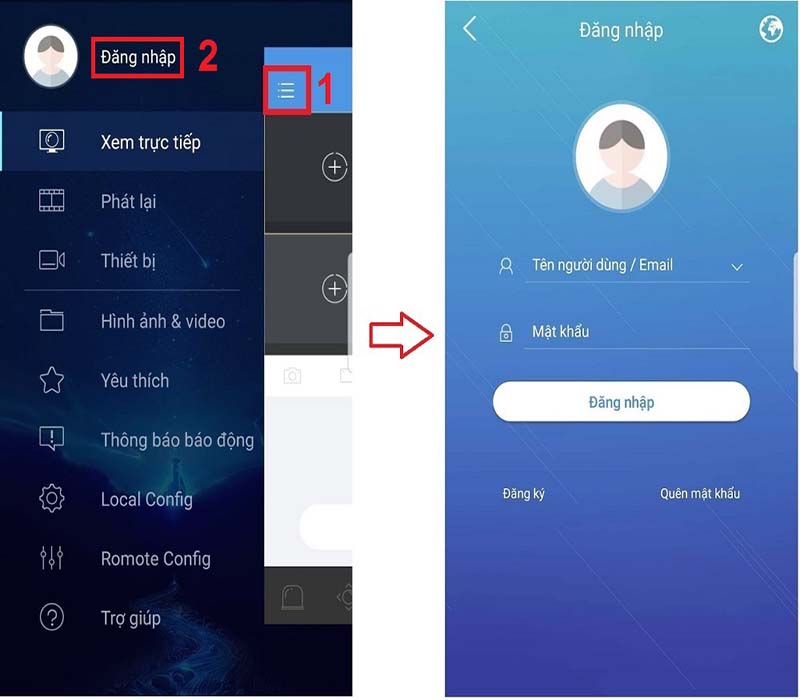
			Cài đặt camera UNV trên điện thoại bằng phần mềm EZView<br  /><br  /><img alt="Cai dat camera UNV bang phan mem EZView" height="700" src="https://ncg.vn/uploads/news/2023_05/cai-dat-camera-unv-bang-phan-mem-ezview.jpg" width="800" /><br  /><br  />&nbsp;<p>Các bước cài đặt như sau: Bấm vào&nbsp;<b>Đăng nhập</b>&nbsp;nếu đã có tài khoản camera UNV, còn nếu chưa có thì tiến hành đăng ký tài khoản nếu bạn sử dụng dịch vụ đám mây EZCloud.</p><p>Để gắn thiết bị Camera UNV vào tài khoản:</p><h4 id="ftoc-doi-voi-cau-hinh-p2p-ezcloud">Đối với cấu hình P2P EZCloud</h4><p><img alt="Cài đặt camera UNV p2p" data-src="https://truongthinhtelecom.com/wp-content/uploads/2021/11/Cai-dat-camera-UNV-p2p.jpg" decoding="async" height="369" src="https://truongthinhtelecom.com/wp-content/uploads/2021/11/Cai-dat-camera-UNV-p2p.jpg" width="800" /></p><p>Nhấn vào mục&nbsp;<b>Thiết bị&nbsp;</b>=&gt;&nbsp;<b>Thêm&nbsp;</b>=&gt; Tiến hành&nbsp;<b>quét mã QR Code</b>&nbsp;bằng Camera điện thoại hoặc nhập thủ công =&gt; Lưu lại để gán thiết bị Camera vào tài khoản EZCloud;</p><h4 id="ftoc-gan-camera-unv-bang-ten-mien-va-dia-chi-ip"><strong>Gán camera UNV bằng tên miền và địa chỉ IP</strong></h4><ul>	<li>Lặp lại thao tác như trên cấu hình P2P EZCloud;</li>	<li>Vào&nbsp;<b>Thiết bị</b>&nbsp;=&gt;&nbsp;<b>Thêm&nbsp;</b>=&gt;&nbsp;<b>Hướng dẫn thêm</b>&nbsp;=&gt; Chọn&nbsp;<b>IP/Tên Miền</b></li></ul><p>Một bảng điền thông tin hiện lên, bạn tiến hành nhập theo form sau đó lưu lại, bao gồm:</p><ul>	<li>Tên thiết bị: tự đặt tên mong muốn</li>	<li>Địa chỉ: Nhập vào địa chỉ IP/Domain</li>	<li>Cổng: nhập mặc định là&nbsp; 80&nbsp;</li>	<li>Tên đăng nhập và Mật khẩu: tài khoản mà bạn đăng nhập vào thiết bị;</li>	<li>Giao thức truyền thông trực tiếp: để mặc định;</li>	<li>Xem trực tiếp : có thể chọn những chế độ xem bạn mong muốn Auto/ SD/ HD/ Trơn tru;</li>	<li>Phát lại: lựa chọn chế độ phát lại như mong muốn như Trơn tru/ Hình ảnh đẹp</li></ul><h4 id="ftoc-gan-ten-mien-dong-ezddns-vao-camera-unv"><strong>&nbsp;Gán tên miền động EZDDNS vào Camera UNV</strong></h4><p>Sau khi quét QR Camera, bạn vào Vào mục Thiết bị =&gt; Thêm&nbsp; =&gt;&nbsp; Hướng dẫn thêm =&gt; Chọn EZDDNS</p><p>Điền vào bảng thông tin:&nbsp;</p><ul>	<li>Tên thiết bị&nbsp;</li>	<li>Địa chỉ máy chủ: điền&nbsp;en.ezcloud.uniview.com</li>	<li>Tên miền: Tên miền đang sử dụng</li>	<li>Tên đăng nhập/Mật khẩu: Tài khoản truy cập của thiết bị</li>	<li>Giao thức truyền thông trực tuyến: Mặc định</li>	<li>Xem trực tiếp: Có thể lựa chọn Auto/SD/HD/Trơn tru</li>	<li>Phát lại: có thể lựa chọn Trơn tru / Hình ảnh đẹp</li></ul>
		</div>
	</div>
	<div id="footer" class="clearfix">
		<div id="url">
			<strong>URL của bản tin này: </strong><a href="https://ncg.vn/news/tin-tuc-cong-ty/cai-dat-camera-unv-tren-dien-thoai-bang-phan-mem-ezview-27.html" title="Cài đặt camera UNV trên điện thoại bằng phần mềm EZView">https://ncg.vn/news/tin-tuc-cong-ty/cai-dat-camera-unv-tren-dien-thoai-bang-phan-mem-ezview-27.html</a>

		</div>
		<div class="clear"></div>
		<div class="copyright">
			&copy; CÔNG TY CP MAY NĂM CHÂU
		</div>
		<div id="contact">
			<a href="mailto:phamhuy842005@gmail.com">phamhuy842005@gmail.com</a>
		</div>
	</div>
</div>
        <div id="timeoutsess" class="chromeframe">
            Bạn đã không sử dụng Site, <a onclick="timeoutsesscancel();" href="https://ncg.vn/#">Bấm vào đây để duy trì trạng thái đăng nhập</a>. Thời gian chờ: <span id="secField"> 60 </span> giây
        </div>
        <div id="openidResult" class="nv-alert" style="display:none"></div>
        <div id="openidBt" data-result="" data-redirect=""></div>
<div id="run_cronjobs" style="visibility:hidden;display:none;"><img alt="" src="/index.php?second=cronjobs&amp;p=x554e0Dm" width="1" height="1" /></div>
<script src="https://ncg.vn/assets/js/jquery/jquery.min.js"></script>
<script>var nv_base_siteurl="/",nv_lang_data="vi",nv_lang_interface="vi",nv_name_variable="nv",nv_fc_variable="op",nv_lang_variable="language",nv_module_name="news",nv_func_name="savefile",nv_is_user=0, nv_my_ofs=-4,nv_my_abbr="EDT",nv_cookie_prefix="nv4",nv_check_pass_mstime=1738000,nv_area_admin=0,nv_safemode=0,theme_responsive=1,nv_is_recaptcha=1,nv_recaptcha_sitekey="6LeSarIUAAAAAHRq6xkHwO6J0YYQOdMxgqKTXoL_",nv_recaptcha_type="image",nv_recaptcha_elements=[];</script>
<script src="https://ncg.vn/assets/js/language/vi.js"></script>
<script src="https://ncg.vn/assets/js/global.js"></script>
<script src="https://ncg.vn/themes/default/js/news.js"></script>
<script src="https://ncg.vn/themes/popovleather/js/main.js"></script>
<script src="https://ncg.vn/themes/popovleather/js/bootstrap.min.js"></script>
</body>
</html>